Every setting a form, every change reviewed#
A router operating system for engineers who want a web interface and refuse to give up the configuration model. Built on VyOS. Sold as a subscription, from $9 a month for one router, with the manual public and the gaps listed.
Nine operations are pending in that picture, and none of them has reached the router. The picture predates 0.9.1, when the bar listed them as commands; they now read as two sentences, and the commands are in Advanced mode.
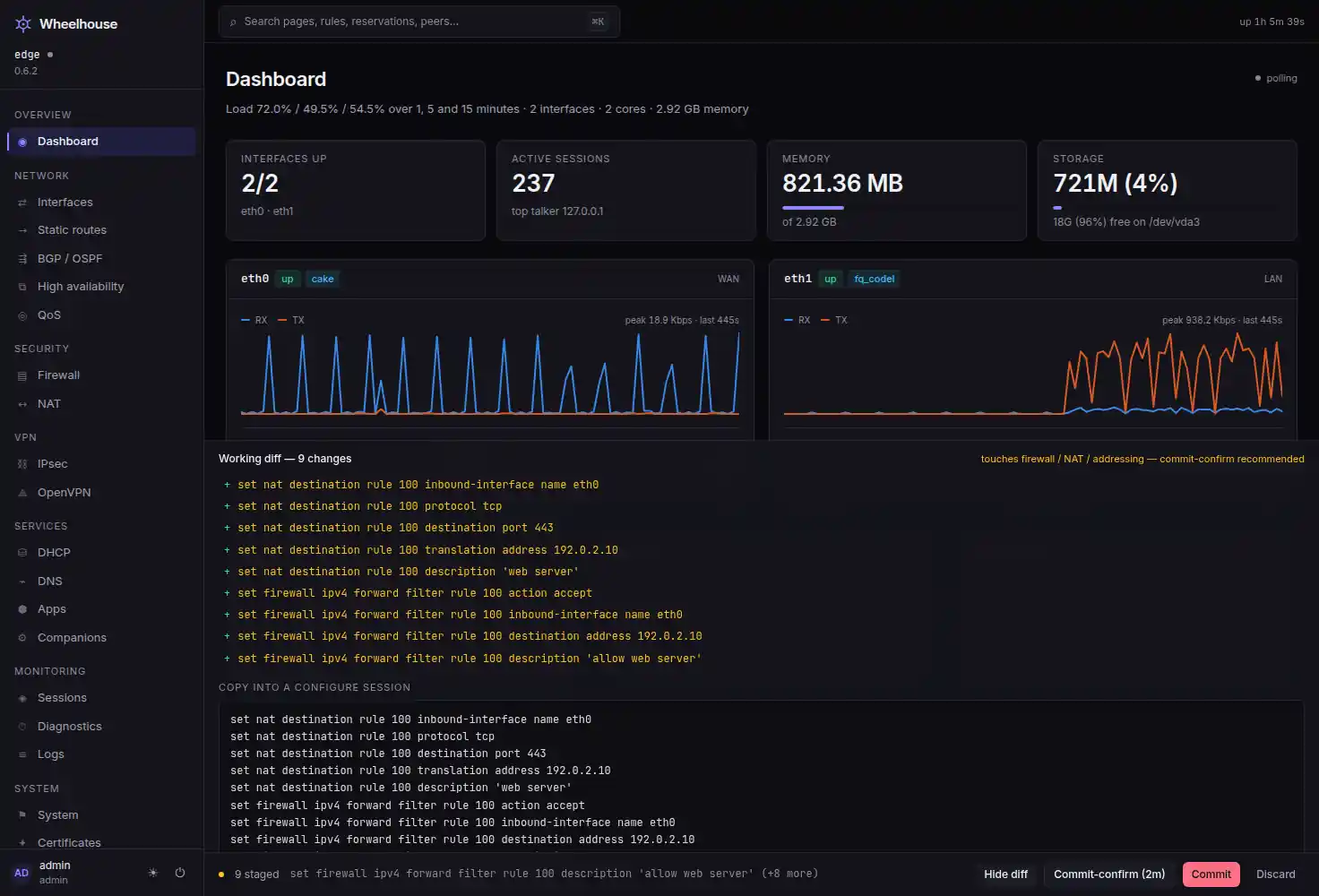
The whole thesis
The configuration model is the foundation. You do not have to read it to use it.
Every setting is a form that checks what you type. Every change waits in one list, said as a sentence, until the Commit Bar applies the whole list as one transaction. The Commit Bar is the only thing in Wheelhouse that applies anything.
Fill in a form, read what will change#
This is the New port forward panel with TCP port 443 published to a server at
192.0.2.10, and Allow these connections left on. Each field is checked as you type:
put something that is not an address in Forward to and the field says Enter an IPv4
address, such as 192.0.2.10. Add port forward stays unavailable until nothing is
wrong. Pressing it changes nothing on the router. It adds this to the pending changes:
NAT
 +  Add port forward “web server”
    TCP port 443 to 192.0.2.10 on eth0
Firewall
 +  Add forward rule 100
    Accept, in on eth0, TCP, to 192.0.2.10, to port 443, “Port forward web server”
Two sentences from one form. The second is the accept rule a destination-NAT rule needs;
the panel offers it, says which rule number it will take, and lets you switch it off.
Every sentence is written from the operations that will be sent, so it says what will run.
Turn on Advanced mode and the same two lines are shown as those operations: the set
commands, in the CLI's own spelling, that paste into a configure session and produce the
same change.
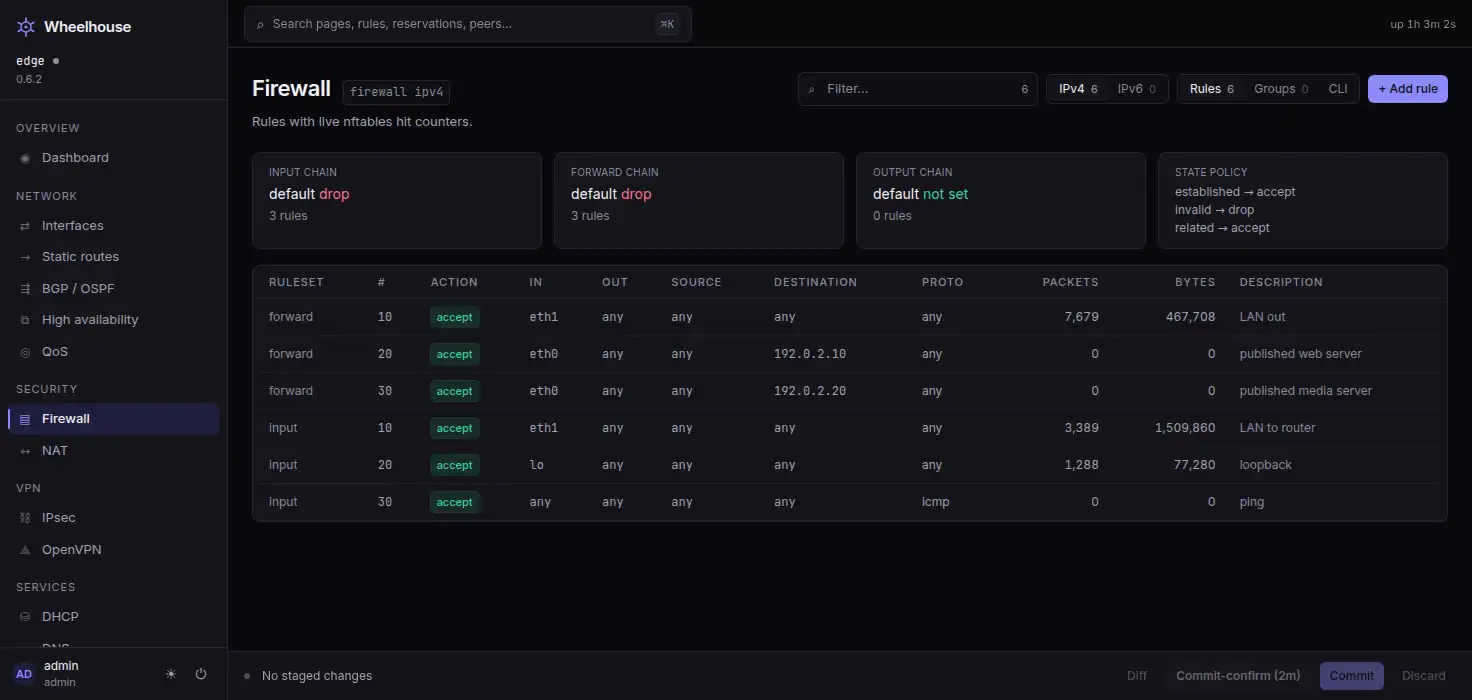
The firewall, with the rules it is enforcing#
Counters come from the live ruleset rather than from the configuration, so a rule that is configured and never matching reads differently from one that is doing work.
Both address families are listed. A rule written for IPv4 does not cover IPv6.
Nothing reaches the router until you apply it#
Pending changes gather in one list that lives on the agent, so a second tab, a colleague on another machine and a script all see the same list. The Commit Bar appears at the foot of the page with the first of them, says how many there are and names the latest. Review changes opens the list, grouped by area: one sentence per change, with Remove on each to take just that one back out.
Changes that can cut you off — firewall rules, NAT, the SSH, HTTPS and API services, an interface's addresses, the uplinks, the default route, router accounts — are marked, the list opens by saying so, and Apply changes takes the danger colour.
Pending changes — 2
These changes could cut off your connection to the router. Apply with auto-revert undoes
them if you lose access.

NAT
 +  Add port forward “web server”                                            Remove
    TCP port 443 to 192.0.2.10 on eth0
Firewall
 +  Add forward rule 100                                                     Remove
    Accept, in on eth0, TCP, to 192.0.2.10, to port 443, “Port forward web server”

 ●  2 pending changes   Add forward rule 100 (+1 more)
      [ Hide changes ]  [ Apply with auto-revert (2 min) ]  [ Apply changes ]  [ Discard ]
Auto-revert
Auto-revert is the router's, not a timer in a web page#
Press Apply with auto-revert (2 min) and the agent calls VyOS' /configure with a
confirm_time: the operating system's own commit-confirm, the one the CLI uses. Unless
Keep changes is pressed inside the window, the router restarts with its saved
configuration. That survives the agent crashing, the browser closing and the link going
down, because none of those is what holds the timer.
While the window is open the Commit Bar becomes the countdown and says why:
Waiting for confirmation — 1:47 left

If this page still responds, the changes work. Keep them, or the router restarts with its
saved configuration when the time runs out.

                              [ Keep changes ]   [ Hide timer ]
The window is a property of the platform rather than a feature of the interface. How auto-revert works.
What is in the box
A form for every setting
Every page edits what it shows, and each value is checked under its field before anything is saved. The commands are one switch away. Forms and commands
Every change reviewed
Changes wait in one list, each said as a sentence, and apply together as one transaction. Each can be removed on its own. The configuration model
Auto-revert, and every revision kept
Apply with the router's own auto-revert armed, and roll back to any archived revision after reading what it changed. How it works
An API for everything
The interface uses the API you get, described by an OpenAPI document the agent generates from its own routes. Automation and the API
Firewall and NAT with live counters
nftables rules beside the packet and byte counts the kernel is keeping for them, IPv4 and IPv6. Firewall and NAT
Apps as configuration objects
40 catalogue entries. Installing one is a change you review and a revision you can roll back. The app store
Why this rather than OPNsense
- The configuration model. VyOS stages, diffs, commits, confirms and archives every revision. OPNsense applies changes as you make them, with no first-class diff. That difference is not a UI decision; it goes all the way down.
- Linux, not FreeBSD. nftables,
tcand CAKE, in-kernel WireGuard, network namespaces, Podman containers as configuration objects, FRR for BGP and OSPF. - Single sign-on with roles and an attributed audit log. OIDC with group-to-role mapping, three server-enforced roles, and an audit entry naming who changed what from where. Neither OPNsense nor pfSense has that at any price.
- Where OPNsense is ahead. It is mature, it has years of hardware reports from real users, a public issue tracker and a large plugin ecosystem. Wheelhouse has none of that yet, and says so in public.
Who it is for, and which plan#
| You are | Today you use | Why you would switch | The plan |
|---|---|---|---|
| A homelab or prosumer engineer | OPNsense or pfSense | Linux features — CAKE, in-kernel WireGuard, nftables, containers — a diffable configuration, and an API that is not an afterthought | Homelab, one router |
| A VyOS CLI operator | The terminal, the JSON API, git | The same set / commit / confirm model you already think in, plus dashboards, live telemetry and a fleet view — and Advanced mode, which puts the commands behind every change back on screen | Lab, three routers and the fleet view |
| A MikroTik power user | Winbox | The same density of control with a modern interface and an honest Linux underneath | Homelab or Lab |
| A small MSP or network team | UniFi, which is too shallow, or an enterprise box, which is too expensive | A multi-site fleet, configuration as data, real routing protocols, single sign-on, roles and an attributed audit trail, and no per-seat pricing | Business, ten routers, commercial use |
Not for: consumer households, CGNAT ISP gear, or WiFi-controller parity with UniFi. Wheelhouse manages the router.
Three plans, the same software on each
Homelab
$9 / month
One router, non-commercial use
Everything on one router: staged diffs with commit-confirm auto-rollback, revision rollback, the app store and desired-state reconcile.
Lab
$19 / month
Three routers, non-commercial use
Everything in Homelab on up to three routers, plus the fleet view across them.
Business
$79 / month
Ten routers, commercial use
Everything in Lab on up to ten routers, licensed for a business's network or a client's. Twenty routers is two units.
A plan is a licence key. It unlocks configuration changes on the router and opens the release host where the image lives; a router whose key has lapsed still signs you in and shows every page, counter, log line and audit entry, and refuses only to change something. No plan includes support, and no plan is per-seat. Yearly billing is ten months' price. Pricing, in full.
What is not finished#
The image has been installed on one physical machine, so there is no hardware
compatibility list and no VM image. IPv6 is observable on its own page and nowhere else:
the Routes page and the neighbour tables are IPv4. Root on the router can still rewrite the
audit log — the hash chain makes a break visible, it does not prevent one. Releases are
not signed. An add system image upgrade has been done end to end in a VM and never on
a physical machine. And nothing is on sale yet: the licence agreement the plans would be
sold under does not exist, so checkout is closed and the beta is by invitation.
That is the short version, and it is the same list the repository keeps. What is finished, and what is not is the long one.
No third parties, here or on the router#
This website loads nothing from anywhere else. No analytics, no tag manager, no hosted font, no embedded video, no cookie banner — there are no cookies to consent to. The router is nearly as quiet: a licence refresh once a day carrying four fields, and a check of the release channel on the same schedule that carries nothing but the request itself — no key, no fingerprint, no host name, not even a version — and that a toggle on the System page turns off. What the licence request carries.
Pick a plan, get the image, make a change
Buying a plan sends the key that unlocks the router and opens the release host. Checkout opens when the licence agreement is written; until then, beta seats by invitation.