What you actually get#
Wheelhouse is an operating system image, not an application you install onto something else. What is in it, what came from where, and what changes when you upgrade.
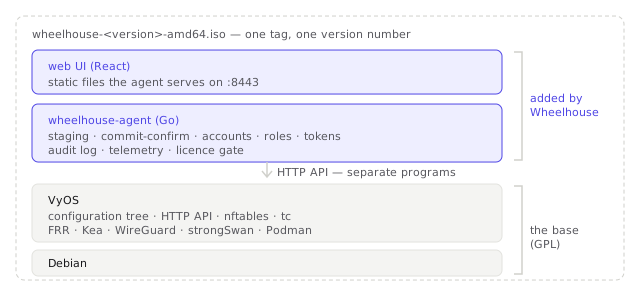
The three parts#
The image. wheelhouse-<version>-amd64.iso, about 595 MB, built from vyos-build with
a Wheelhouse image flavour. It boots as a live system, runs a dialog installer on the first
console, and installs onto a disk using VyOS' own install image. Both UEFI and legacy
BIOS boot are built in.
The agent. wheelhouse-agent, one static Go binary at /usr/bin/wheelhouse-agent, run
by a systemd unit as root. It is the control plane: it drives VyOS' HTTP API for everything
the configuration tree can express, holds the staging area, authenticates people, keeps the
audit log, parses operational state, and serves the API and the UI on 0.0.0.0:8443 over
TLS.
The web UI. A React single-page application, built to static files at
/usr/share/wheelhouse/ui and served by the agent. It has no server of its own and no
build step at runtime; it is the same API you get, consumed by a browser.
One version number#
The agent, the UI, the installer, the packaging and the image are built and released together from one tag and share a version. An upgrade is one artefact, and the version you quote in a support conversation is unambiguous.
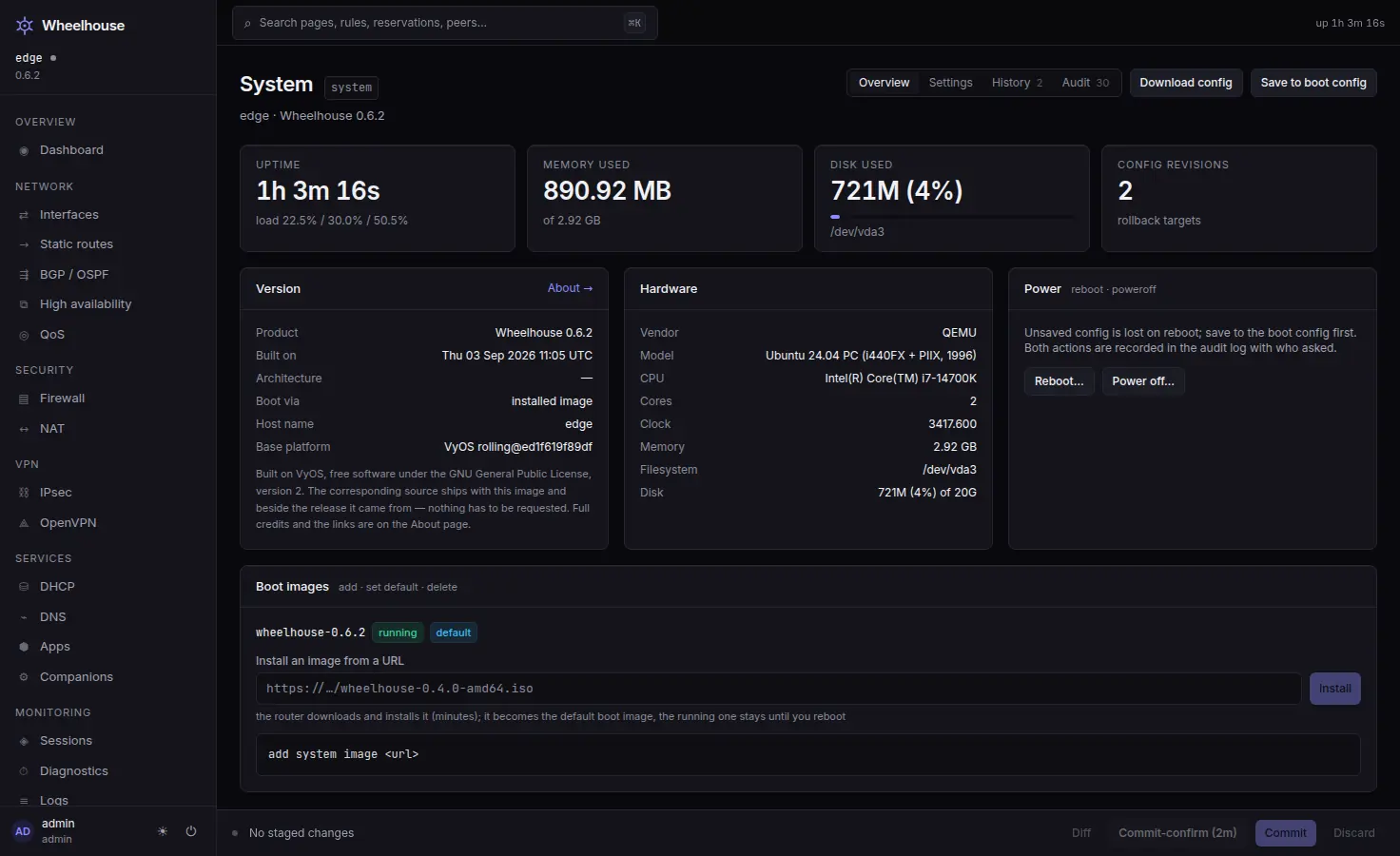
The console banner carries both halves above every login — the product's version at the top, the base's beneath the rule. The same pair is on the System page.
  Wheelhouse 0.5.1 -- edge
  ==========================================================================
  Web UI:    https://192.168.1.1:8443  (eth1)
  Sign in:   with your Wheelhouse admin account
  Console:   wheelhouse, with the password chosen at install
             vyos is kept for recovery
  --------------------------------------------------------------------------
  Built on VyOS rolling@ed1f6191c0a2
  Licences and corresponding source: /usr/share/doc/wheelhouse
  ==========================================================================
Each release's files are at https://releases.rhymelikedi.me/v<version>/.
Where the base ends and Wheelhouse begins#
Wheelhouse is built on VyOS, which is built on Debian.
| Provided by the base | Added by Wheelhouse |
|---|---|
The Linux kernel and its networking: nftables, tc, in-kernel WireGuard, namespaces, VLANs, bridges, bonds | The agent: staging, commit-confirm, revision rollback, accounts, roles, tokens, the audit log, the telemetry stream, the licence gate |
The configuration tree itself: set, commit, commit-confirm, revisions, rollback | The web UI: the pages and their forms, the pending changes in sentences, the Commit Bar, the ⌘K palette, and Advanced mode for the commands |
The daemons: FRR, Kea, pdns-recursor, strongSwan, OpenVPN, Suricata, Podman | The installer and the unattended seed path |
| The HTTP API the agent drives | The app catalogue and the integration hints |
| The Debian package base and its drivers | The image flavour, the packaging and the release pipeline |
The agent and the UI are separate programs from every GPL component. The agent talks to
VyOS over its documented HTTP API and over operational-mode commands. It links against no
VyOS code and copies none — no file in the product is derived from vyos-1x, FRR, Kea,
pdns-recursor, nftables or the kernel.
Every image carries SOURCES-<version>-amd64.txt: the vyos-build commit it was built from and
every package version in it. It is beside the image on the download host and on the
installed system under /usr/share/doc/wheelhouse/, so a customer holding only the box can
still get from it back to the source. The VyOS trademark is not ours; images are self-built
and rebranded per upstream's trademark policy, attribution intact.
What survives an upgrade#
/config is VyOS' persistent partition, and it is where Wheelhouse keeps everything of
yours:
| Path | Holds |
|---|---|
/config/wheelhouse/state.json | accounts, password hashes, TOTP secrets, API token hashes, sessions, settings and the licence key. Mode 0600. |
/config/wheelhouse/audit.jsonl | the audit log, in its own append-only file beside the state |
/config/wheelhouse/api-key | the VyOS API key the agent authenticates to the router with |
/config/wheelhouse/agent.crt, agent.key | the TLS certificate and its private key |
/config/config.boot and /config/archive/ | the running configuration and its archived revisions |
/config/apps/… | container volumes for apps you installed, left behind on uninstall |
VyOS keeps the previous image beside the new one after an upgrade, so the old system is still bootable. That is the platform's mechanism rather than something Wheelhouse adds.
What it does not include#
- No arm64 image. amd64 UEFI or BIOS only. An arm64
.debis published, but it is for running the agent off-router against an arm64 VyOS box — it will not give you a Wheelhouse router. - No VM image. No qcow2, raw, OVA or VHD. A VM install is the same install as a physical one: attach the ISO and answer the questions.
- No wireless. VyOS can configure
interfaces wirelessfrom the CLI; the UI has no page for it and the installer does not offer it. Put an access point behind the router. - No SSH, until you ask for it. Neither the image's default configuration nor the
installer writes
service ssh. A freshly installed router has no SSH at all and the console is the only shell.
Running the agent without the image#
The agent also runs on another machine, pointed at an existing VyOS router's HTTP API. It is how you can look at Wheelhouse against a router you already have without reinstalling anything. Everything that reads works; the parts that need the router's own filesystem — creating an app's volume directories, for one — say so instead, and Advanced mode gives the command to run on the router.
wheelhouse-agent --demo starts with no router credentials at all. It is not a demo in the
sense of fixture data: there is none, and every router read fails until you supply
--api-url and --api-key. It is good for looking at the shape of the interface, and for
attaching a runnable reproduction to a bug report about the agent or the UI.
Put it on a box
The image, its checksum and its corresponding-source record are published for every tag.