How it works#
Four steps: open a form, fill it in, add the change to the pending changes, and apply them with a window that restarts the router on its saved configuration if you were wrong. Each one below carries the call the interface makes.
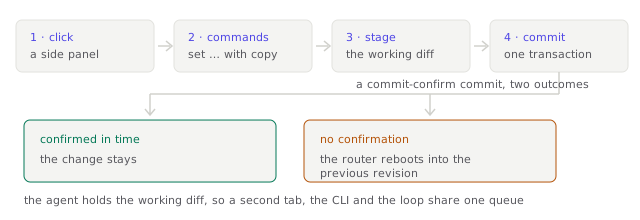
The diagram predates 0.9.1. Its second step is now the form's own checks and a sentence in the Commit Bar; the commands it shows are in Advanced mode.
1. Click#
Protect → NAT
You press Add port forward and a side panel slides in over the table. The table stays readable behind it; nothing in Wheelhouse uses a modal for real work.
The picture is from 0.6.2, before the 1:1 section could be edited from the page.
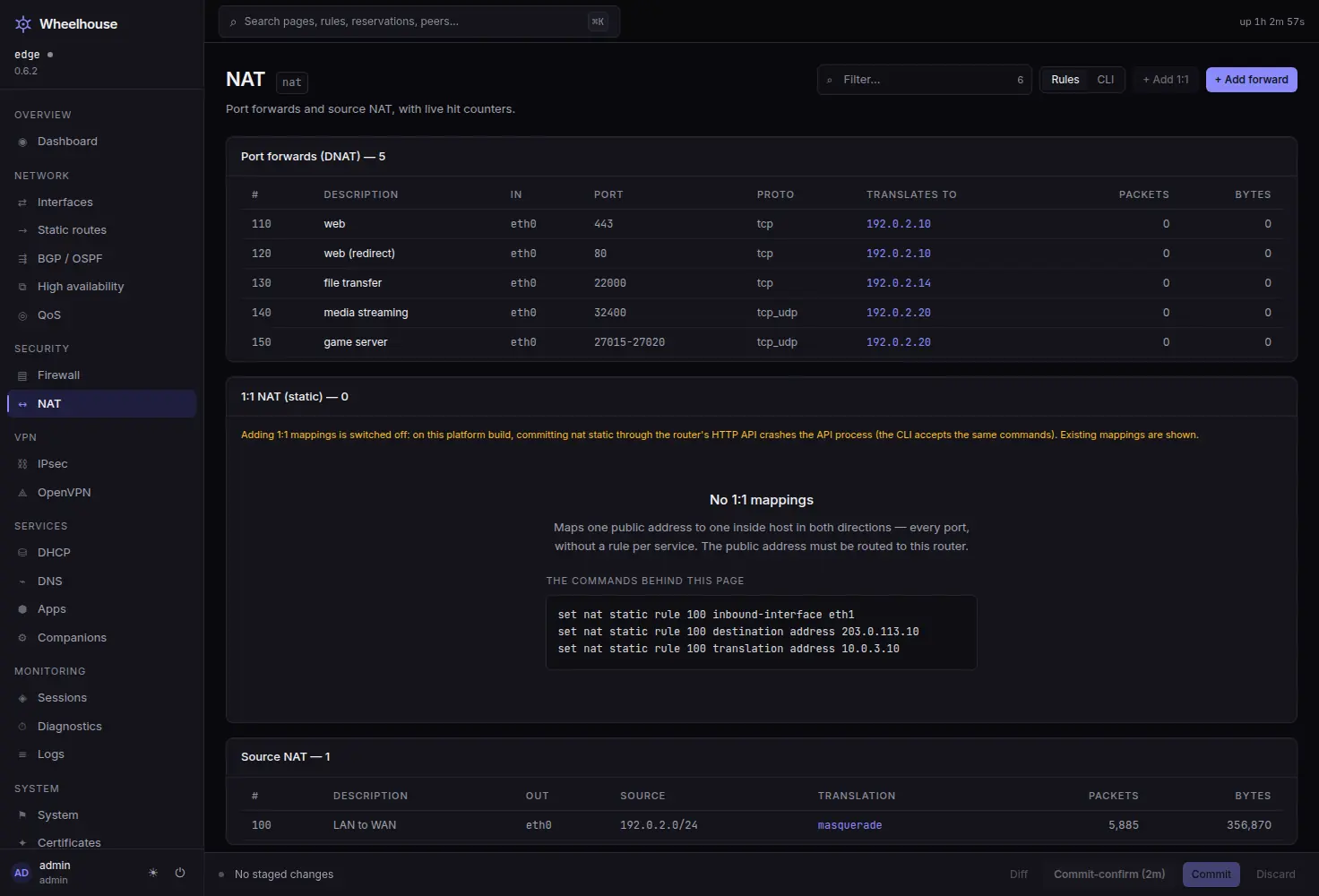
The panel is a form: a description, the interface the connections arrive on, the protocol, the external port, the address to forward to and, when it differs, the port on the device. Two switches offer the rules that go with a forward — Allow these connections, the firewall rule that lets it through, and Also reachable on the public address from inside, the hairpin pair for clients on the LAN using the public address.
2. Fill it in#
Each field is checked as you type, and the reason sits under the field. Put something that is not an address in Forward to and it reads Enter an IPv4 address, such as 192.0.2.10. Add port forward stays unavailable until nothing is wrong, so a value the router would refuse never reaches it.
Under Firewall the panel says which rule it will add — Adds forward rule 100. — or, when a rule already lets these connections through, names that rule and adds nothing.
With Advanced mode on, the panel also shows the commands it will add, updating as you type:
set nat destination rule 100 description 'web server'
set nat destination rule 100 inbound-interface name eth0
set nat destination rule 100 protocol tcp
set nat destination rule 100 destination port 443
set nat destination rule 100 translation address 192.0.2.10
set firewall ipv4 forward filter rule 100 action accept
set firewall ipv4 forward filter rule 100 inbound-interface name eth0
set firewall ipv4 forward filter rule 100 protocol tcp
set firewall ipv4 forward filter rule 100 destination address 192.0.2.10
set firewall ipv4 forward filter rule 100 destination port 443
set firewall ipv4 forward filter rule 100 description 'Port forward web server'
The spelling is the CLI's, quoting included, so the block pastes into a configure session
on the console and produces the same change. The browser and the agent quote identically:
a value with a space is quoted in both, so what you read is what runs. In Advanced mode,
System → Configuration tree shows any part of the running configuration the same way,
as the commands that would recreate it.
3. Add it to the pending changes#
Pressing Add port forward sends the operations to the agent and nothing else happens. No commit, no partial apply, no daemon reload.
curl -sk -X POST "$R/api/stage" \
  -H "Authorization: Bearer $T" -H 'Content-Type: application/json' \
-d '[{"op":"set","path":["nat","destination","rule","100","protocol","tcp"]}]'{"staged": 1,
"ops": [{"op": "set", "path": ["nat","destination","rule","100","protocol","tcp"]}],
"commands": ["set nat destination rule 100 protocol tcp"]}Three things about that response.
The pending changes live on the agent, not in your browser. A second tab sees them, and
so does a colleague signed in from another machine, wheelhouse-agent apply --agent-url …
and the optional reconcile loop. Every call that changes the list hands the whole list
back.
Only set and delete are accepted. Anything else is refused with the reason, at the
door rather than at commit time.
An empty path element is refused too. description '' is rejected by the agent instead
of failing later in the router's voice.
In the browser, the Commit Bar appears with 2 pending changes. Review changes lists them as sentences — Add port forward “web server” and Add forward rule 100 — each with its particulars on a second line and a Remove beside it.
4. Apply#
The Commit Bar offers two buttons and they do different things.
Apply changes sends the list to VyOS' /configure endpoint as one transaction. Either
all of it lands or none of it does.
Apply with auto-revert (2 min) sends the same transaction with a confirm_time, which
arms the router's own commit-confirm:
{"success": true, "data": "\nInitialized commit-confirm; 2 minutes to confirm before reboot\n"}That is the router talking. Unless Keep changes is pressed inside the window, the router restarts with its saved configuration. Not a silent revert — a restart. The Commit Bar's countdown says so while the window is open.
Keeping the changes is one more call, and the router answers:
{"success": true, "data": "Reboot timer stopped\n"}And then#
Every commit is archived. The commit history is VyOS' revision list: revision 0 is the running configuration, revision 1 is the commit before it. The interface says in sentences what a revision changed — the router's own diff, in Advanced mode — before you take it, and rolling back loads that archived configuration the same way the CLI command does.
Every commit is audited. The audit log records the actor, their role, their source
address, the exact commands and whether the router accepted them. A request refused by
the role check is recorded too, as denied <method> <path>.
A refused change shows the router's own reason. When VyOS refuses a change, its reason is what appears, without the command text around it — not a translation of it. Advanced mode shows the whole message.
The same four steps, from a script#
Nothing above is a UI-only path. The interface uses the API you get, with an API token in place of the browser's session cookie:
R=https://<router>:8443
T=wh_...                                    # an API token with the operator role

curl -sk -X POST "$R/api/stage"  -H "Authorization: Bearer $T" \
  -H 'Content-Type: application/json' -d @ops.json
curl -sk      "$R/api/staged"    -H "Authorization: Bearer $T"
curl -sk -X POST "$R/api/commit" -H "Authorization: Bearer $T" \
  -H 'Content-Type: application/json' -d '{"confirm_minutes":2}'
curl -sk -X POST "$R/api/commit/confirm" -H "Authorization: Bearer $T"
Token requests skip the CSRF header that browser sessions must send, which is why a token is the right credential for automation and a copied cookie is not.
Try the four steps on your own box
The image is published for every tag, with its checksum and its source record.
Read on#
- The configuration model — pending changes, revisions and rollback in full.
- A form for every setting, the commands on request — the forms, the sentences, and what Advanced mode adds.
- API-first, and configuration as code — the desired-state file and the reconcile loop.
- The wiki explains each concept on its own page: pending changes, the Commit Bar, apply with auto-revert and revisions and rollback.