Interfaces, routing and uplinks#
The parts of a router that decide where a packet goes, with the live state shown beside the configuration that was supposed to produce it.
Interfaces#
The table merges what the configuration declares with what the kernel reports: counters, MTU, the attached qdisc, link state. An interface the kernel has and the configuration does not declare is flagged as drift rather than quietly listed.
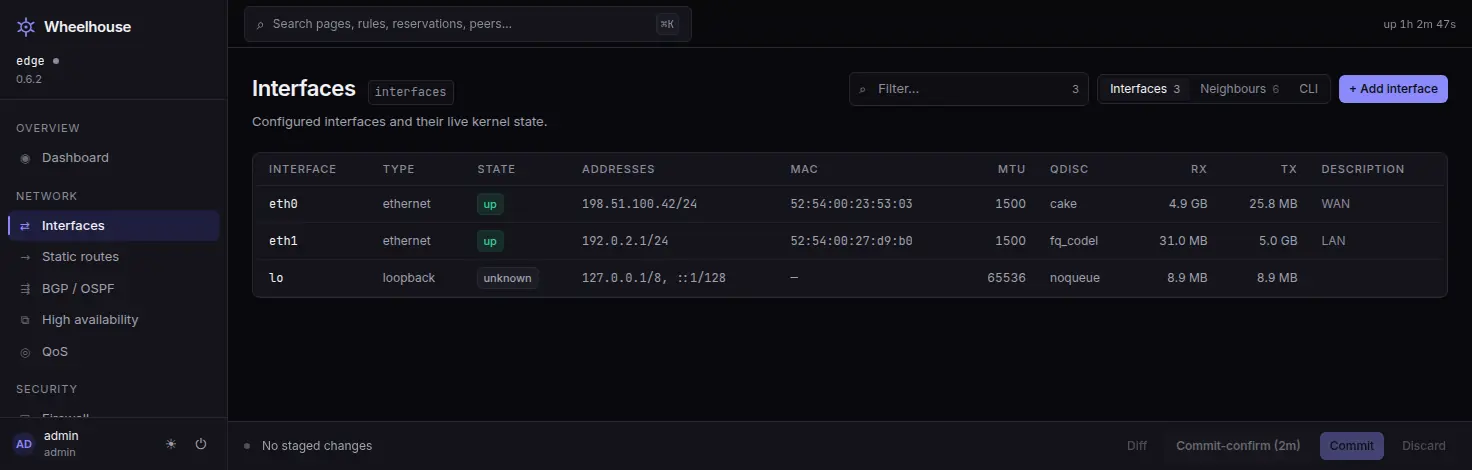
Interfaces, in detail#
The add-interface editor covers VLAN (802.1Q), bridge, bond with LACP, tunnel (GRE, IP-in-IP, SIT), VXLAN and dummy. The detail panel edits MTU, disables an interface administratively, and adds or removes addresses. PPPoE uplinks are created by the add-uplink wizard on the High availability page, because a PPPoE interface is an uplink before it is an interface.
The page also carries a neighbours view of the resolved addresses the kernel holds. LLDP — what the switch on the other end says it is, and which of its ports you are plugged into — is on Observe → Diagnostics → Neighbors, beside the ARP table.
Static routes#
The Static routes page shows the router's forwarding table and the declared static routes side by side, so a route you configured that the kernel is not using shows up as exactly that. Adding, editing and deleting a route are side panels that check each value under its field, like every other editor.
BGP and OSPF#
FRR is in the base, so the routing protocols are real ones rather than a plugin. The BGP / OSPF page reports whether each is configured and shows the configuration, with the same staging and commit behaviour as everything else.
Multi-WAN, through all five mechanisms#
VyOS has no gateway object. An uplink is any interface that carries a default route, and the agent finds them through every mechanism the platform offers:
| Mechanism | Configuration | Ranking knob | Default |
|---|---|---|---|
| Static | protocols static route 0.0.0.0/0 next-hop <gw> distance <n> | distance | 1 |
| DHCP client | interfaces … address dhcp | dhcp-options default-route-distance | 210 |
| PPPoE client | interfaces pppoe pppoeN | default-route-distance | 1 |
| Failover | protocols failover route 0.0.0.0/0 next-hop <gw> | metric | 1 |
| Load balancing | load-balancing wan interface-health <if> | rule weights | 1 |
Each uplink is joined with the live forwarding table, the kernel's link state, the load balancer's own report and the source-NAT rules, and the page shows per uplink: its addressing, its gateway (declared, or learned from the table when it came from DHCP), its rank and role, whether its default route is selected, installed, present or absent, and which NAT rule masquerades behind it.
There is an add-uplink wizard, a health-check editor, load-balancing rules, policy routing, and per-uplink NAT. Every one of those actions counts as dangerous and offers commit-confirm: they all decide which way packets leave, including the ones carrying your session.
Three mistakes the page catches: an uplink with no health check is never withdrawn;
dhcp-options no-default-route on a DHCP uplink that also has a dhcp-interface failover
entry makes the daemon install nothing while its own tests keep passing; and a check
target with no route through its own uplink leaves that uplink unable to take traffic back
once its route has been withdrawn. The health-check editor stages those target routes with
every check.
High availability#
One page, three tabs: Uplinks (the above), VRRP (keepalived groups, with live
state from show vrrp, add, disable, delete, priority and sync groups) and Connection
sync, and a fourth, CLI, in Advanced mode.
VRRP here is configuration you write, not availability that arrives switched on.
Read on#
- Firewall and NAT.
- The wiki: Uplinks, a second uplink with failover, Interfaces.
Put it in front of your own uplinks
Two NICs and a disk is the whole requirement for a VM. The interface table and the forwarding table are the first two pages to look at.