Firewall and NAT#
Two pages that do most of the day-to-day work, built so that the rule you are looking at and the packets going through it are on the same screen.
Rules, with counters#
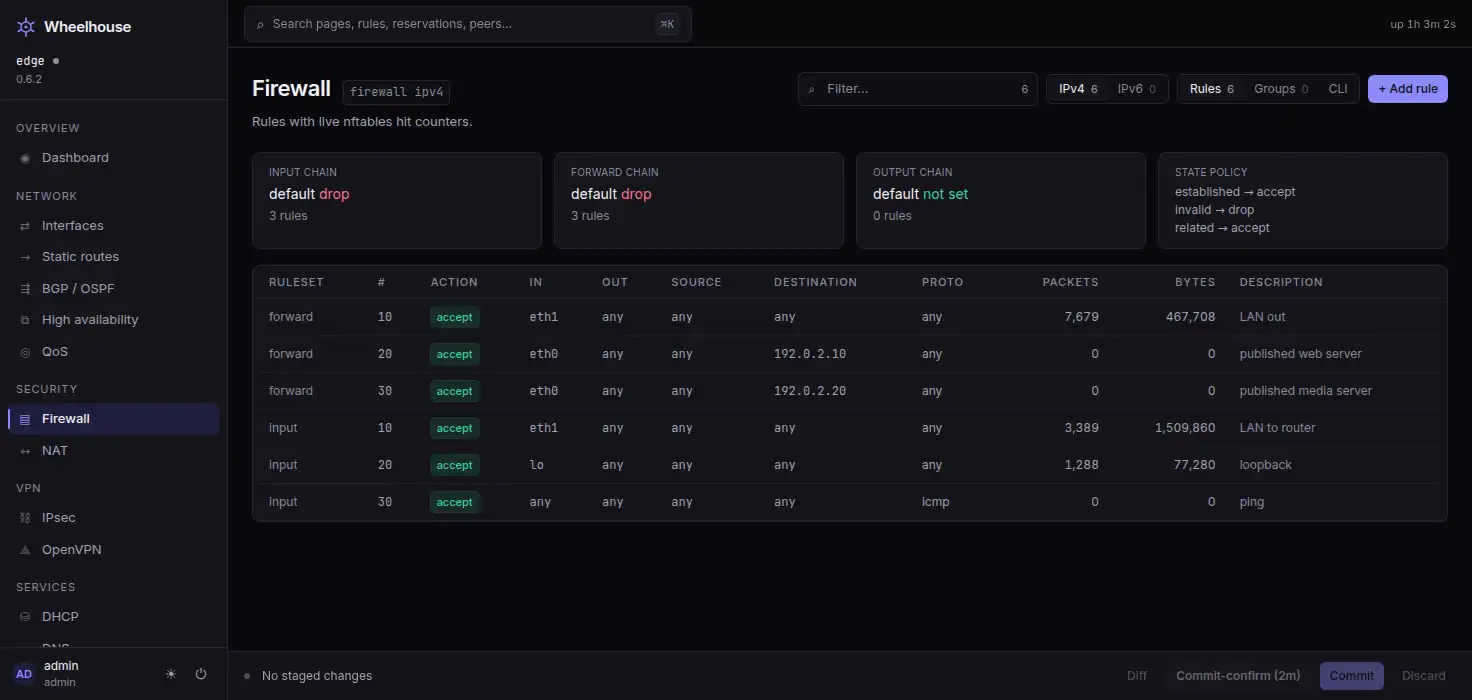
The rule table is the configured ruleset joined with the router's own firewall
statistics, so each rule carries its hit count. The summary cards state each chain's
default action and the state policy. A rule that is never matched looks different from a
rule that is matched constantly.
Add, edit and delete are all side panels over the table, and every one of them checks each value under its field before anything is added to the pending changes. Logging is a per-rule toggle.
Groups are an editor, not a read-only list#
Every kind VyOS supports is editable: address, network, port, domain, MAC, interface, and the IPv6 address and network groups. Create a group, add and remove members, delete it. The rule editor references groups as source, destination or port.
The page also refuses to offer an ipv6-address-group to an IPv4 rule, because that
combination commits and then does nothing.
A router with no groups says what a group is and offers the button that makes the first one:
No firewall groups
A group is a named set of addresses, networks, ports or domains that rules match on.
[ Add group ]
In Advanced mode the same empty state also lists a command that would create one.
Port forwards that work the first time#
A destination-NAT rule with no matching filter rule fails silently: the translation happens and the packet is dropped a moment later. The New port forward panel offers the accept rule alongside the forward, switched on by default and numbered into a free slot in the forward chain, and says which rule it will add. The pending changes then list both: the forward, and the rule that lets it through.
It will also stage the hairpin pair — the LAN-side destination NAT on the public address plus the matching masquerade — for clients inside the network that use the public address. That needs the WAN address and the LAN network, and where the router cannot supply them the option is not offered rather than staged half-formed.
Per-rule counters are joined from nat statistics the same way the firewall's are. Source
NAT has its own table and editor. The NAT page is here.
Inline intrusion prevention, if you want it#
The firewall is also how packets reach the IPS engine: a rule with action queue and
queue-options bypass hands matched packets to a kernel queue that a Suricata container
verdicts. It is described on the VPN and intrusion detection page.
What the installer writes#
If you leave the Firewall box ticked during the install, and there is a WAN, you get a default-drop input and forward policy on both address families, with established and related accepted, invalid dropped, the LAN allowed out, ICMP accepted, and the DHCP or DHCPv6 client's own return traffic permitted on the WAN. Nothing in it opens the management port from the WAN.
Unticking the box raises a screen that says the router will accept everything arriving from the internet, and its default answer is Turn it on.
Read on#
- Security — the posture in summary.
- The wiki: firewall rules and publishing a service.
Watch your own counters move
The rule table joins the configured ruleset to the router's own statistics. It is the quickest way to see whether the model is worth the switch.